Building My Dynamic Developer Portfolio: More Than Just a Personal Website
Why I decided to build a dynamic portfolio that acts as my blog, CMS, job tracker, and personal developer operating system.
Building My Dynamic Developer Portfolio
A portfolio is often the first impression a developer makes. Most portfolios showcase projects, list skills, and provide a way to get in touch. While that's enough to get started, I wanted mine to be something I actually use every day—not just something recruiters visit.
Instead of creating another static portfolio, I decided to build a dynamic platform that grows with my career.
Why Build Another Portfolio?
As my experience grew, I noticed the same problems repeating themselves.
Every new project meant manually updating my portfolio.
Every blog post lived on a different platform.
My résumé had multiple versions.
Job applications were buried inside my email.
Ideas were scattered across notes and documents.
After a while, maintaining everything became more difficult than building it.
That's when I realized my portfolio shouldn't simply display my work—it should become the central hub for everything related to my career.
The Vision
I no longer think of this project as just a portfolio.
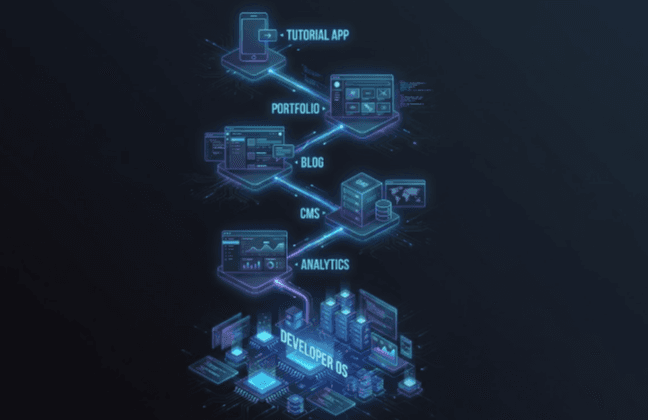
I think of it as my Developer Operating System.
It should become the place where I can manage everything related to software development.
That includes:
- Projects
- Blog posts
- Skills
- Experience
- Résumé
- Job applications
- Analytics
- Learning notes
- Personal branding
Instead of using several disconnected tools, I want one platform that brings everything together.
Choosing the Tech Stack
I wanted a modern stack that's enjoyable to work with while remaining scalable for years.
Frontend
- Next.js
- React
- TypeScript
- Tailwind CSS
- Framer Motion
- MDX
Backend
- PostgreSQL
- Prisma ORM
- Next.js Server Actions
- REST APIs
- Authentication
Deployment
- Vercel
- GitHub
- Google Search Console
- Vercel Analytics
Every technology was chosen because it solves a real problem rather than simply following trends.
Dynamic Project Management
Projects are no longer hardcoded into the website.
Instead, they're managed through an admin dashboard where I can:
- Create projects
- Edit existing ones
- Save drafts
- Feature selected projects
- Upload images
- Add GitHub repositories
- Link live demos
- Organize technologies
Publishing a new project should take minutes, not hours.
Integrated Blogging
Writing has become an important part of my learning process.
Instead of publishing articles elsewhere, I wanted complete ownership of my content.
The blog supports:
- MDX
- Syntax highlighting
- Reading time
- Categories
- Tags
- SEO metadata
- Related articles
- Table of contents
Every article contributes to my personal knowledge base.
Admin Dashboard
One of the most useful parts of this project is the dashboard.
Rather than editing source files manually, everything can be managed through a clean interface.
From one place I can manage:
- Projects
- Blog posts
- Skills
- Experience
- Media
- Résumé
- Analytics
The goal is to make publishing as simple as writing.
Job Application Tracker
Applying for jobs usually means searching through emails weeks later to remember when and where I applied.
To solve that, I'm building a dedicated application tracker.
Each application stores:
- Company
- Position
- Application date
- Resume version
- Cover letter
- Current status
- Interview notes
- Follow-up reminders
Eventually, I plan to synchronize this with Gmail so applications can be tracked automatically.
Resume Generator
Instead of maintaining multiple PDF files, I want a single source of truth.
My experience will be stored once, allowing me to generate tailored résumés for different opportunities.
Examples include:
- Frontend Developer
- Full Stack Developer
- Backend Developer
- Remote positions
- International companies
Updating my experience once updates every version.
SEO from Day One
A portfolio has little value if nobody can discover it.
That's why SEO is built into every page.
The website includes:
- Meta titles
- Meta descriptions
- Open Graph images
- Structured data
- Canonical URLs
- XML sitemap
- Robots.txt
- RSS feed
Every blog post is optimized before it's published.
Performance Matters
Performance isn't something I want to optimize later.
It's part of the development process from the beginning.
My goals include:
- Fast page loads
- Optimized images
- Static generation where appropriate
- Server-side rendering
- Code splitting
- Excellent Lighthouse scores
A fast website creates a better experience for everyone.
Design Philosophy
I prefer clean interfaces over flashy ones.
The design focuses on:
- Readable typography
- Consistent spacing
- Responsive layouts
- Smooth animations
- Accessibility
- Dark mode support
Good design should help users focus on the content rather than distract them.
Looking Ahead
This project is only getting started.
Some of the features I plan to add include:
- AI-assisted writing
- AI-powered project search
- Interactive project demos
- Public API
- Reading list
- Newsletter
- Portfolio CMS
- Career timeline
- GitHub insights
- Google Drive integration
- Email synchronization
- Interview preparation dashboard
Each new feature solves a problem I encounter during my daily workflow.
Could It Become a SaaS?
Possibly.
Many developers struggle with managing projects, writing blogs, tracking applications, and maintaining a professional online presence.
If this platform proves valuable for my own workflow, I may eventually turn it into a SaaS product that helps other developers manage their careers from one place.
For now, my focus is simple:
Build something that I genuinely enjoy using every single day.
Final Thoughts
This project started as a portfolio.
Today it's becoming much more.
It's my blog.
My CMS.
My résumé.
My project showcase.
My learning journal.
My analytics dashboard.
My job application tracker.
And ultimately, my Developer Operating System.
A portfolio should evolve alongside the person building it.
That's exactly what I'm building.